未完待续。。。
day3 前缀树路由
Trie树
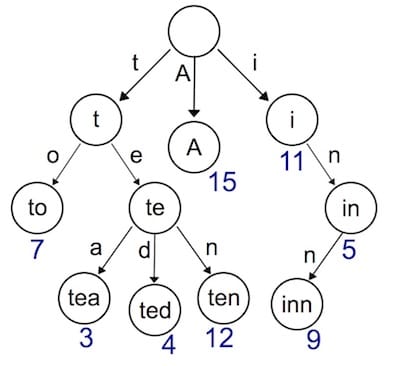
在前一节我们使用map结构存储路由表(key是具体请求的路由,value是对应的HandlerFunc),使用map存储键值对,索引非常高效。但是有一个弊端,键值对的存储的方式,只能用来索引静态路由。
那如果我们想支持类似于/hello/:name这样的动态路由怎么办呢?所谓动态路由,即一条路由规则可以匹配某一类型而非某一条固定的路由。
我们想要实现的是:/hello/alan or /hello/vhsj --路由到–> /hello/:name索引到的处理函数下 (获取路径参数)/asset/anything/like/CSSfiles/path --路由到–> /asset/*filename索引到的处理函数下 (静态资源请求)
所以我们引入前缀树来实现动态路由,添加路由表的时候我们会使用带有通配符(:/*)的路由注册到树中并所引导对应的处理函数,然后到查询的时候我们会解析request的具体路径,从根节点开始递归的查询,一层层往下匹配(通配符会有特殊的处理,例如“:”需要解析路径参数保存,而“*”则需要结束匹配保存路径的后半部分)直到叶子结点(在中间停止也是失败的,例如请求路径“/user/alan” 不可以 匹配路由“/user/:name/hahaha”)
规则不用多说,直接看怎么实现:
1
2
3
4
5
6
7
8
9
10
11
12
13
14
15
16
17
18
19
20
21
22
23
24
25
26
27
28
29
30
31
32
33
34
35
36
37
38
39
40
41
42
43
44
45
46
47
48
49
50
51
52
53
54
55
56
57
58
59
60
61
62
63
64
65
66
67
68
69
70
71
72
73
74
75
76
77
78
79
80
81
82
83
84
85
86
87
88
package geeimport "strings" type node struct { pattern string part string children []*node isWild bool } func (n *node) string ) *node { for _, c := range n.children { if c.part == part || c.isWild { return c } } return nil } func (n *node) string ) []*node { nodes := []*node{} for _, c := range n.children { if c.part == part || c.isWild { nodes = append (nodes, c) } } return nodes } func (n *node) string , parts []string , height int ) { if len (parts) == height { n.pattern = pattern return } part := parts[height] child := n.matchChild(part) if child == nil { child = &node{ part: part, isWild: part[0 ] == ':' || part[0 ] == '*' , } n.children = append (n.children, child) } child.insert(pattern, parts, height+1 ) } func (n *node) string , height int ) *node { if len (parts) == height || strings.HasPrefix(n.part, "*" ) { if n.pattern == "" { return nil } return n } part := parts[height] children := n.matchChildren(part) for _, child := range children { result := child.search(parts, height+1 ) if result != nil { return result } } return nil }
实现动态路由
现在使用新的数据结构来存储路由表实现我们的目标:通配符路由注册 + 动态请求路径匹配
定义路由:roots中key为Method,value是树根,意为一种req method一棵树;handlers中key为注册的路由(含有通配符的),value为对应的处理函数
1
2
3
4
5
6
7
8
9
10
11
type router struct { roots map [string ]*node handlers map [string ]HandlerFunc } func NewRouter () return &router{ roots: make (map [string ]*node), handlers: make (map [string ]HandlerFunc), } }
解析路径:把实际的请求路径切割成一个个part
1 2 3 4 5 6 7 8 9 10 11 12 13 14 15 func parsePattern (pattern string ) string { vs := strings.Split(pattern, "/" ) parts := make ([]string , 0 ) for _, item := range vs { if item != "" { parts = append (parts, item) if item[0 ] == '*' { break } } } return parts }
添加和查询路由:对应TrieTree的插入和搜索
1
2
3
4
5
6
7
8
9
10
11
12
13
14
15
16
17
18
19
20
21
22
23
24
25
26
27
28
29
30
31
32
33
34
35
36
37
38
39
40
41
func (r *router) string , pattern string , handler HandlerFunc) { parts := parsePattern(pattern) key := method + "-" + pattern _, ok := r.roots[method] if !ok { r.roots[method] = &node{} } r.roots[method].insert(pattern, parts, 0 ) r.handlers[key] = handler } func (r *router) string , path string ) (*node, map [string ]string ) { searchParts := parsePattern(path) params := make (map [string ]string ) root, ok := r.roots[method] if !ok { return nil , nil } n := root.search(searchParts, 0 ) if n != nil { parts := parsePattern(n.pattern) for index, part := range parts { if part[0 ] == ':' { params[part[1 :]] = searchParts[index] } if part[0 ] == '*' && len (part) > 1 { params[part[1 :]] = strings.Join(searchParts[index:], "/" ) break } } return n, params } return nil , nil }
day4分组控制
什么是分组控制
分组控制(Group Control)是 Web 框架应提供的基础功能之一。简单理解就是,很多的路由有共同的需求可以集中处理设置(中间件),例如:
以/post开头的路由匿名可访问。
以/admin开头的路由需要鉴权。
以/api开头的路由是 RESTful 接口,可以对接第三方平台,需要三方平台鉴权。
所以路由分组主要是可以方便功能扩展、提升代码注册逻辑性、减少大量重复代码编写。
实现逻辑
首先一个分组需要什么呢?一个公共的前缀prefix、一组公共处理逻辑(中间件)middlewares、领导/管理者/上层抽象,即我们的引擎engine,所以RouterGroup可以定义为:
1
2
3
4
5
type RouterGroup struct { prefix string middlewares []HandlerFunc engine *Engine }
然后我们在引擎结构中也嵌入(embeding)Group,那么enigin就可以直接使用Group的所有方法,相当于engine是group的子类。
1 2 3 4 5 6 7 8 9 10 11 12 13 14 type Engine struct { *RouterGroup router *router groups []*RouterGroup } func New () engine := &Engine{router: NewRouter()} engine.groups = []*RouterGroup{} engine.RouterGroup = &RouterGroup{engine: engine} return engine }
1.嵌入(Embedding)的作用
Engine通过嵌入*RouterGroup,可以直接使用RouterGroup的所有方法(GET、POST、Group等)。但这不是继承 ,而是方法提升(method promotion) 。
1
2
3
4
5
6
7
8
9
type Engine struct { *RouterGroup router *router groups []*RouterGroup } engine.GET("/" , handler) engine.Group("/v1" )
2.为什么用嵌入而不是普通属性?
API一致性和便利性
1
2
3
4
5
6
7
type Engine struct { group RouterGroup router *router } engine.group.GET("/" , handler) engine.group.Group("/v1" )
用嵌入后,Engine和RouterGroup有相同的API接口,使用者不需要关心是操作根路由组还是子路由组。
根路由组的特殊性 Engine本质上就是一个根路由组 ,它具有:
能注册路由(GET、POST)
能创建子路由组(Group)
另外还能启动服务器(Run、ServeHTTP)
用嵌入表示这种"is-a"关系(Engine 是一个 RouterGroup)。
然后把所有根路由有关的方法定义到Group上面即可:
1 2 3 4 5 6 7 8 9 10 11 12 13 14 15 16 17 18 19 20 21 22 23 24 25 26 27 28 func (rg *RouterGroup) string ) *RouterGroup { engine := rg.engine newRg := &RouterGroup{ prefix: rg.prefix + prefix, engine: engine, } engine.groups = append (engine.groups, newRg) return newRg } func (rg *RouterGroup) string , comp string , handler HandlerFunc) { pattern := rg.prefix + comp log.Printf("Route %4s - %s" , method, pattern) rg.engine.router.addRoute(method, pattern, handler) } func (rg *RouterGroup) string , handler HandlerFunc) { rg.addRoute("GET" , pattern, handler) } func (rg *RouterGroup) string , handler HandlerFunc) { rg.addRoute("POST" , pattern, handler) }
eigine作为根可以使用上面的函数,另外也有其他:
1
2
3
4
5
6
7
8
9
10
func (e *Engine) string ) error { return http.ListenAndServe(addr, e) } func (e *Engine) context := newContext(w, r) e.router.handle(context) }
使用示例
1
2
3
4
5
6
7
8
9
10
11
12
13
14
15
16
17
18
19
20
21
22
func main () r := gee.New() r.GET("/" , func (c *gee.Context) c.Html(http.StatusOK, "<h1>Hello Gee</h1>" ) }) r.GET("/hello" , func (c *gee.Context) c.String(http.StatusOK, "hello %s, you're at %s\n" , c.Query("name" ), c.Path) }) r.GET("/hello/:name" , func (c *gee.Context) c.String(http.StatusOK, "hello %s, you're at %s\n" , c.Param("name" ), c.Path) }) r.GET("/assets/*filepath" , func (c *gee.Context) c.JSON(http.StatusOK, gee.H{"filepath" : c.Param("filepath" )}) }) r.Run(":9999" ) }
day5中间件
什么是中间件
中间件(middlewares),简单说,就是非业务的技术类组件。
再简单点的,在当前的框架中,中间件本质上也是一个个HandlerFunc,他们通过求情的context获取需要的信息,然后完成相应的功能,并且像链条一样往后执行(Next),直到最后一步到达我们的业务处理HandlerFunc,执行完之后再沿着这个链条返回回去(其中可能中间件还有代码要执行)。
中间件设计
就以最简单的统计请求处理时长为例:
1
2
3
4
5
6
7
8
9
func Logger () return func (c *Context) t := time.Now() c.Next() log.Printf("[%d] %s in %v" , c.StatusCode, c.R.RequestURI, time.Since(t)) } }
中间件是加在 RouterGroup(路由分组)上的。如果把中间件加在最顶层的 Group(engine),就是全局中间件,所有请求都会经过它。
那为什么不直接把中间件加在每一条路由上呢?其实如果只针对某一条路由用中间件,还不如直接在 Handler 里写逻辑,反而更直观。中间件的意义就在于“通用”,如果只服务于一条路由,灵活性和复用性都很差,也就不适合叫中间件了。
在我们的框架设计里,请求进来后会先匹配路由,然后把请求的所有信息都放到 Context 里。中间件也是一样:请求进来后,先找到所有应该作用在这条路由上的中间件,按顺序放进 Context,然后依次执行。为什么要这样?因为中间件不仅可以在业务 Handler 之前做事,还可以在 Handler 执行完之后继续处理(比如日志、收尾工作等),所以需要统一管理。
为此,我们给 Context 增加了两个参数,并定义了 Next 方法:
1
2
3
4
5
6
7
8
9
10
11
12
13
14
15
16
17
18
19
20
21
22
23
24
25
26
27
28
29
30
31
32
33
type Context struct { Writer http.ResponseWriter Req *http.Request Path string Method string Params map [string ]string StatusCode int handlers []HandlerFunc index int } func newContext (w http.ResponseWriter, req *http.Request) return &Context{ Path: req.URL.Path, Method: req.Method, Req: req, Writer: w, index: -1 , } } func (c *Context) c.index++ s := len (c.handlers) for ; c.index < s; c.index++ { c.handlers[c.index](c) } }
框架实现
直接看全文+注释
1
2
3
4
5
6
7
8
9
10
11
12
13
14
15
16
17
18
19
20
21
22
23
24
25
26
27
28
29
30
31
32
33
34
35
36
37
38
39
40
41
42
43
44
45
46
47
48
49
50
51
52
53
54
55
56
57
58
59
60
61
62
63
64
65
66
67
68
69
70
71
72
73
74
75
76
77
78
79
80
81
82
83
84
85
86
87
88
package geeimport ( "log" "net/http" "strings" ) type Engine struct { *RouterGroup router *router groups []*RouterGroup } type RouterGroup struct { prefix string middlewares []HandlerFunc engine *Engine } func New () engine := &Engine{router: NewRouter()} engine.groups = []*RouterGroup{engine.RouterGroup} engine.RouterGroup = &RouterGroup{engine: engine} return engine } func (rg *RouterGroup) string ) *RouterGroup { engine := rg.engine newRg := &RouterGroup{ prefix: rg.prefix + prefix, engine: engine, } engine.groups = append (engine.groups, newRg) return newRg } func (rg *RouterGroup) string , comp string , handler HandlerFunc) { pattern := rg.prefix + comp log.Printf("Route %4s - %s" , method, pattern) rg.engine.router.addRoute(method, pattern, handler) } func (rg *RouterGroup) string , handler HandlerFunc) { rg.addRoute("GET" , pattern, handler) } func (rg *RouterGroup) string , handler HandlerFunc) { rg.addRoute("POST" , pattern, handler) } func (e *Engine) string ) error { return http.ListenAndServe(addr, e) } func (engine *Engine) var middlewares []HandlerFunc for _, group := range engine.groups { if strings.HasPrefix(req.URL.Path, group.prefix) { middlewares = append (middlewares, group.middlewares...) } } c := newContext(w, req) c.handlers = middlewares engine.router.handle(c) } func (group *RouterGroup) group.middlewares = append (group.middlewares, middlewares...) }
相应的handle方法也要更新,主要是添加上业务handlerFunc + 启动这个链条的执行(第一个调用Next)
1 2 3 4 5 6 7 8 9 10 11 12 13 14 15 16 17 18 19 20 21 func (r *router) n, params := r.getRoute(c.Method, c.Path) if n != nil { key := c.Method + "-" + n.pattern c.Params = params c.handlers = append (c.handlers, r.handlers[key]) } else { c.handlers = append (c.handlers, func (c *Context) c.String(http.StatusNotFound, "404 NOT FOUND: %s\n" , c.Path) }) } c.Next() }